Development-stage software. Synthetic demonstration available; customer pilot and production use remain blocked.Current readiness
The Synaporia console

Your work, its evidence and the next decision.

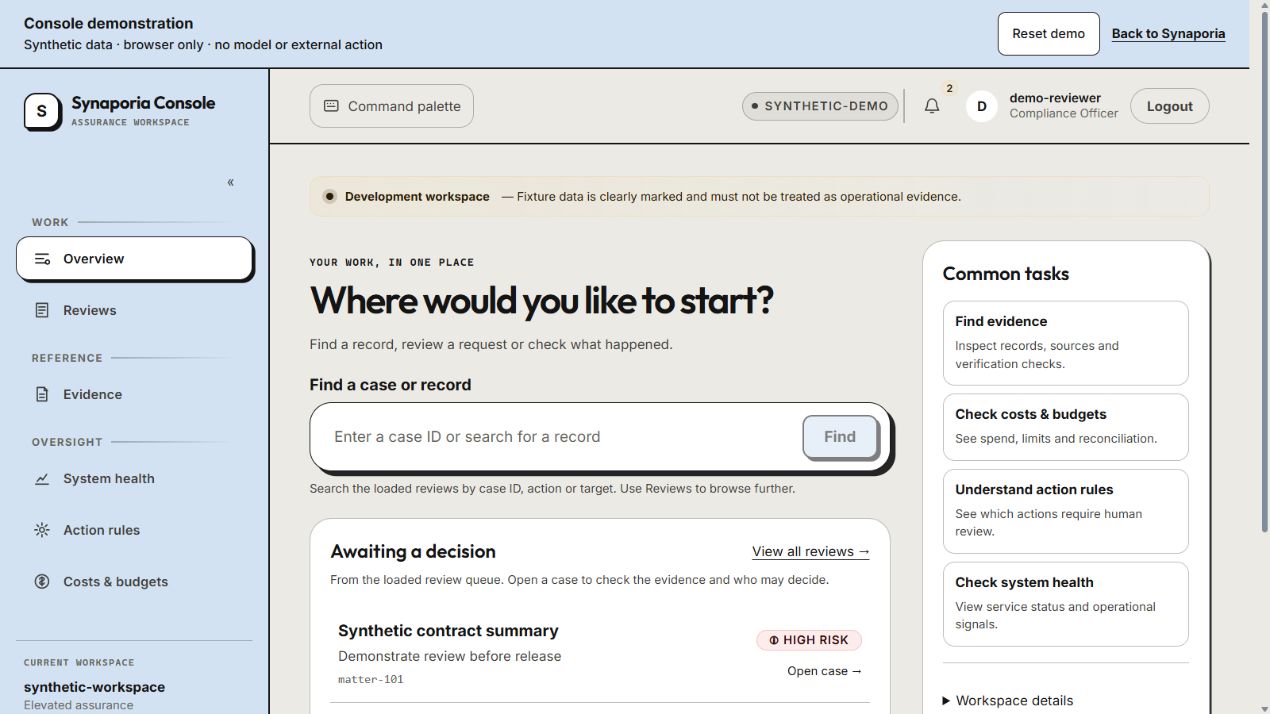
Explore the same workspace, case review, evidence and financial screens registered in the current console. The demonstration replaces the API transport with synthetic browser fixtures; the product components and navigation are shared.

Actual console screens. Isolated demonstration.

See the workbench in action.

Start with Overview, open a pending request, find a case or check costs and budgets. All identities and amounts are synthetic. Model calls, approval decisions, data reveals, budget changes and external actions are refused.

Synaporia console workspace using synthetic records
Open full-screen demonstration

The console loads only when you launch it. No live backend is connected.

One connected workspace

Follow the record behind the answer.

Work & cases

Navigate with business context.

Choose a pending request or search the loaded reviews by case ID, action or target. Record lookup is separate from AI drafting. Open the case to inspect the action, review version and expiry, then follow its explicitly linked investigation and remaining obligations.

Evidence

Inspect what was checked.

The example contains a real content hash of synthetic fields. Its signature and external anchor are absent. Use the real console verifier to see those distinct properties; the record proves no external event.

Financial

Explore the six financial views.

Example spend, budgets and reconciliation are explicitly fixtures. Unit economics and provider-statement exports are unavailable because no customer economics or invoice has been measured.

Keep attention on the work

Understand the next decision.

Find the record, review the intended consequence and keep unfinished work visible.

Find before you generate.

Record lookup uses the existing read path. AI drafting is a separate task, available only where its governed profile is enabled. The public demonstration has no model connection.

Review a specific version.

Inspect the action, source evidence, approval expiry and intended consequence. Changed approvals require a fresh review. This demonstration records no approval decisions.

See what remains.

Follow an investigation’s objective, artifact reference and unresolved obligations. Accepted work, an approved action and a confirmed external outcome are separate states.

What sits behind the workbench

Useful assistance, with visible operating boundaries.

These ideas from the original guided demonstration remain part of the product design. The current shared console makes real local surfaces inspectable; it does not simulate proof that every control is installed. Review current readiness.

Boundaries

Policy before meaningful work.

The design checks organisational rules before protected work continues. Unsupported cases must not silently become permission.

Evidence

Keep each step reviewable.

Local hash, signature and lineage checks establish specific record properties. They do not prove an assertion is true or that all external actions were intercepted.

Privacy

Use only the context the task permits.

Purpose, sensitivity, source authority and lifecycle are part of the control model. Local masking is not a guarantee that every identifier will be found.

Loops & cost

Bound the work, not just the prompt.

Attempts, time, resource use, acceptance and unresolved obligations need explicit contracts. Provider bills and operational economics still require qualification.

Recovery

Treat uncertain results as uncertain.

Timeouts and repeat requests need durable ownership, bounded retries and reconciliation. A local claim does not establish atomic remote execution.

Channels

Fit the working environment.

Business APIs, browser workflows and basic-mobile contracts have different boundaries. The website console is not a live carrier, messaging or customer-cloud connection.

Current implementation boundary

A demonstration is not a deployment.

This is the actual console UI using a separate fixture transport, not a customer installation or authenticated production session. The normal console build does not import the demo transport. The installed default profile remains model-disabled. Business Hub and Intelligence are target designs and are not presented as working screens here.